Export audio and subtitles
You can export after the full project audio is ready. Audio downloads are available on paid plans. Generate and listen to the project first; the Export control remains disabled until full audio is ready.
Download the merged MP3
- In the player bar, confirm generation has finished and play the result.
- Select Export.
- If your account is not eligible, the dialog explains that exporting is available on paid plans. Review the plan options shown there.
- When eligible, leave Include each section as a separate audio file unchecked and choose Download to download the merged project audio.
Download sections and full audio
In the Export dialog, select Include each section as a separate audio file, then choose Download. The downloaded ZIP contains separate section audio files and the merged audio.
Generate subtitles
- In Export Audio, select Generate subtitles (SRT) file when the option is available for your account.
- Select Download SRT.
- Leave Start offset at 0 seconds to start subtitles with the audio, or enter the delay you need.
- Select Export in the subtitle popover to download the SRT.
The SRT is a separate file; it is not embedded in the MP3 or bundled with the section ZIP.
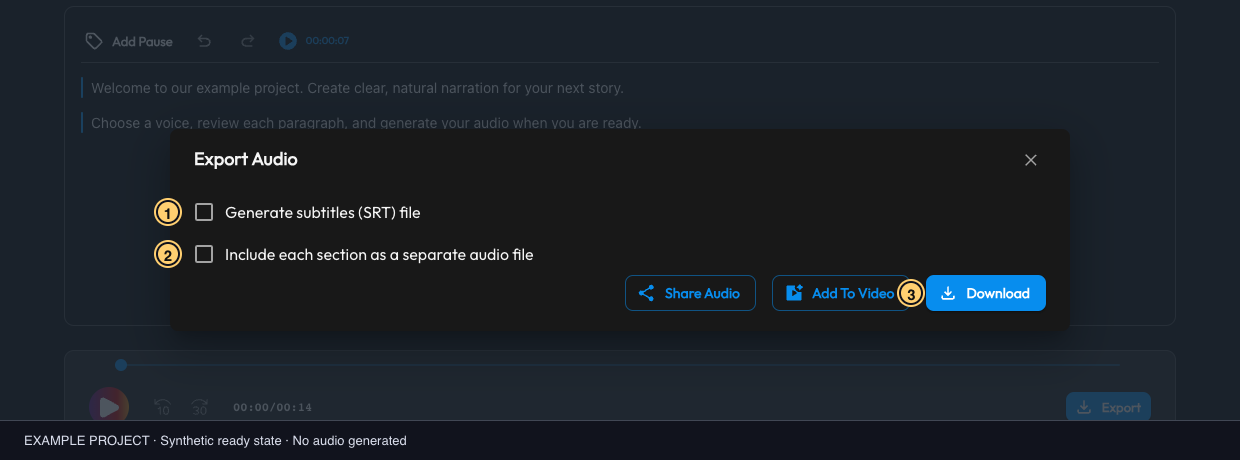
Example export dialog: 1 separate SRT subtitles; 2 section ZIP; 3 Download. This uses a synthetic audio-ready state. Select the image to view it full size.
If a download is missing
See Export troubleshooting: first verify full-project generation and eligibility, then check the browser's download prompt and destination. Do not regenerate audio solely because a browser download did not appear.
For sharing a listen-only link, use Share Audio. For the generation step, see Generate audio.